
Your Zoho CRM, now powered by AI calls
Every call, appointment, and campaign — automatically logged and synced to Zoho CRM in real time.
How Zoho Integration Helps Your Business
From capturing leads to closing deals — AI-powered calls supercharge every part of your Zoho workflow.
Never Lose a Lead Again
Every caller is automatically added to Zoho CRM. No more sticky notes or forgotten follow-ups.
Save 2+ Hours/Day on Data Entry
Call notes, transcripts, outcomes, and next steps auto-populate. Your team focuses on selling, not typing.
Instant Follow-Up
When a lead comes in, Call Agent AI can automatically send an email, text confirmation, or trigger a Zoho workflow — within seconds of the call ending.
Run Outbound Campaigns at Scale
Upload contacts from Zoho, set your script, and let AI call each one. Results flow back to CRM automatically.
Real-Time Visibility
See every call, appointment, and campaign result in your Zoho dashboard. No delays, no gaps.
Works with Your Existing Setup
No need to change your Zoho layout. Call Agent AI integrates with Leads, Contacts, Deals, Bookings, and custom modules.
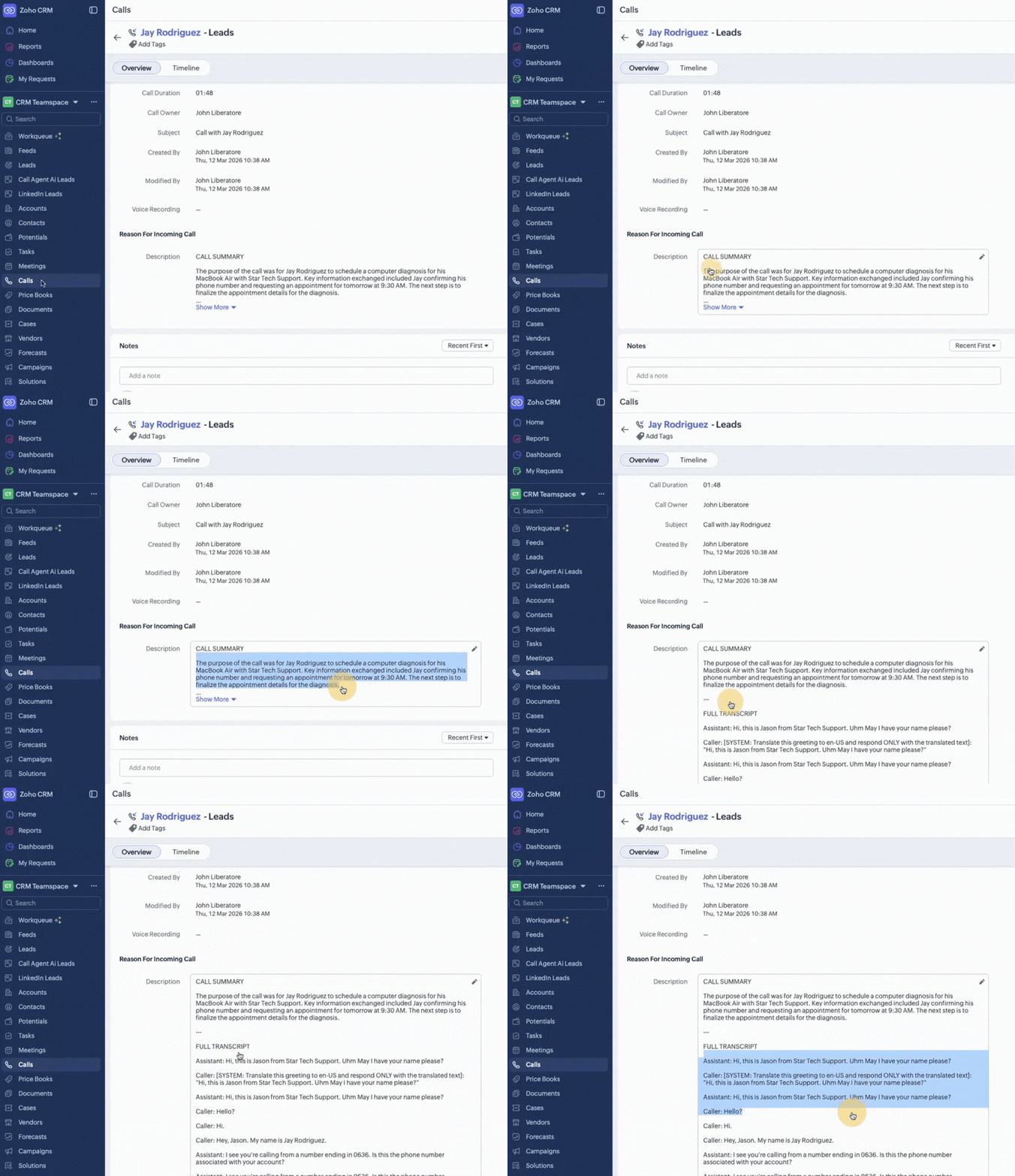
Call Ends → Notes Auto-Populate in Zoho
AI summaries synced instantly with call duration, notes, and follow-ups. Zero manual data entry. Every call automatically logged to Zoho CRM with outcomes, caller details, transcripts, and next steps.
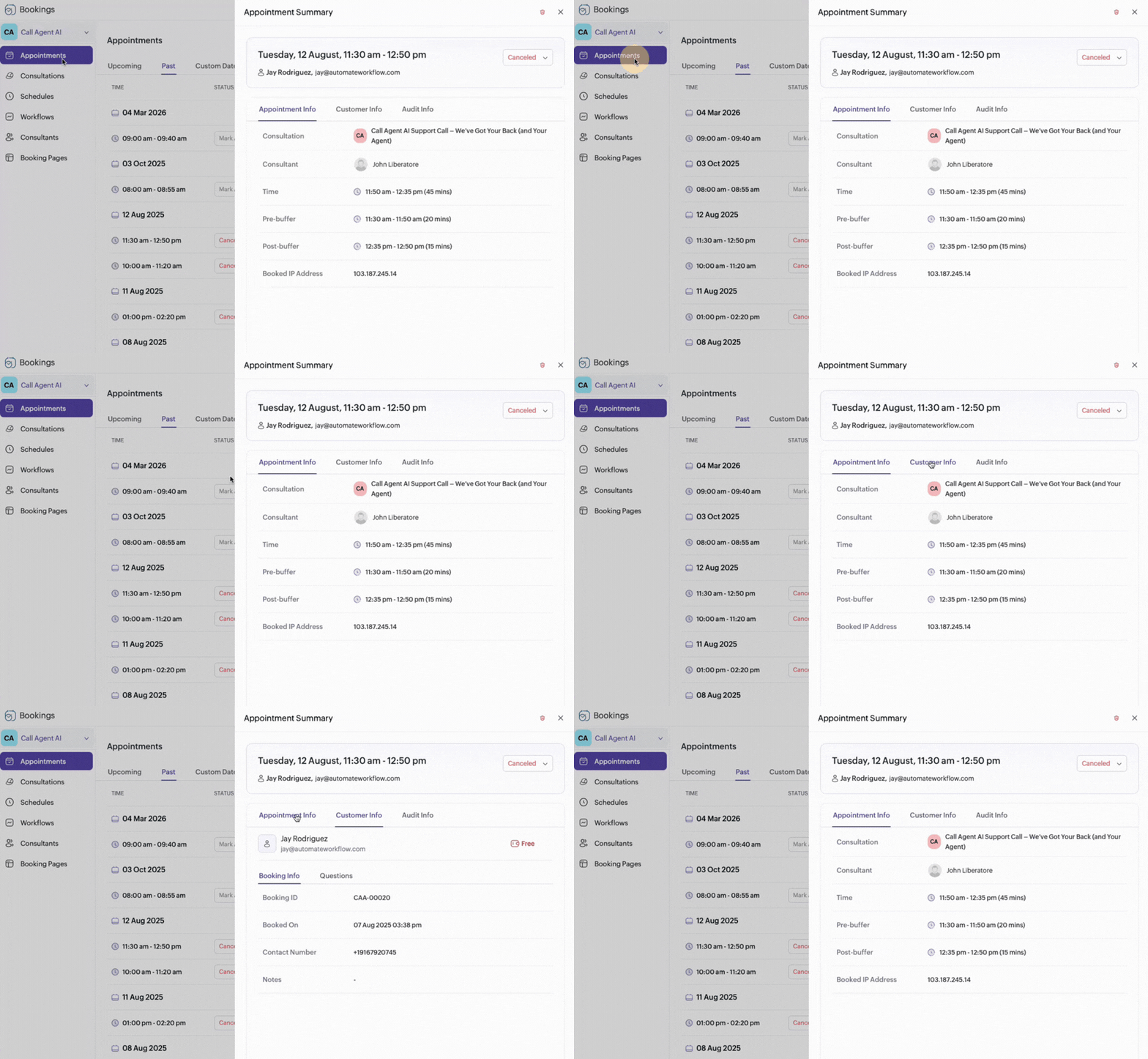
Appointments Booked → Straight to Zoho
AI books appointments during the call, and they appear in Zoho Bookings automatically. Calendar sync, confirmation SMS sent, and reminder workflows triggered — all hands-free.
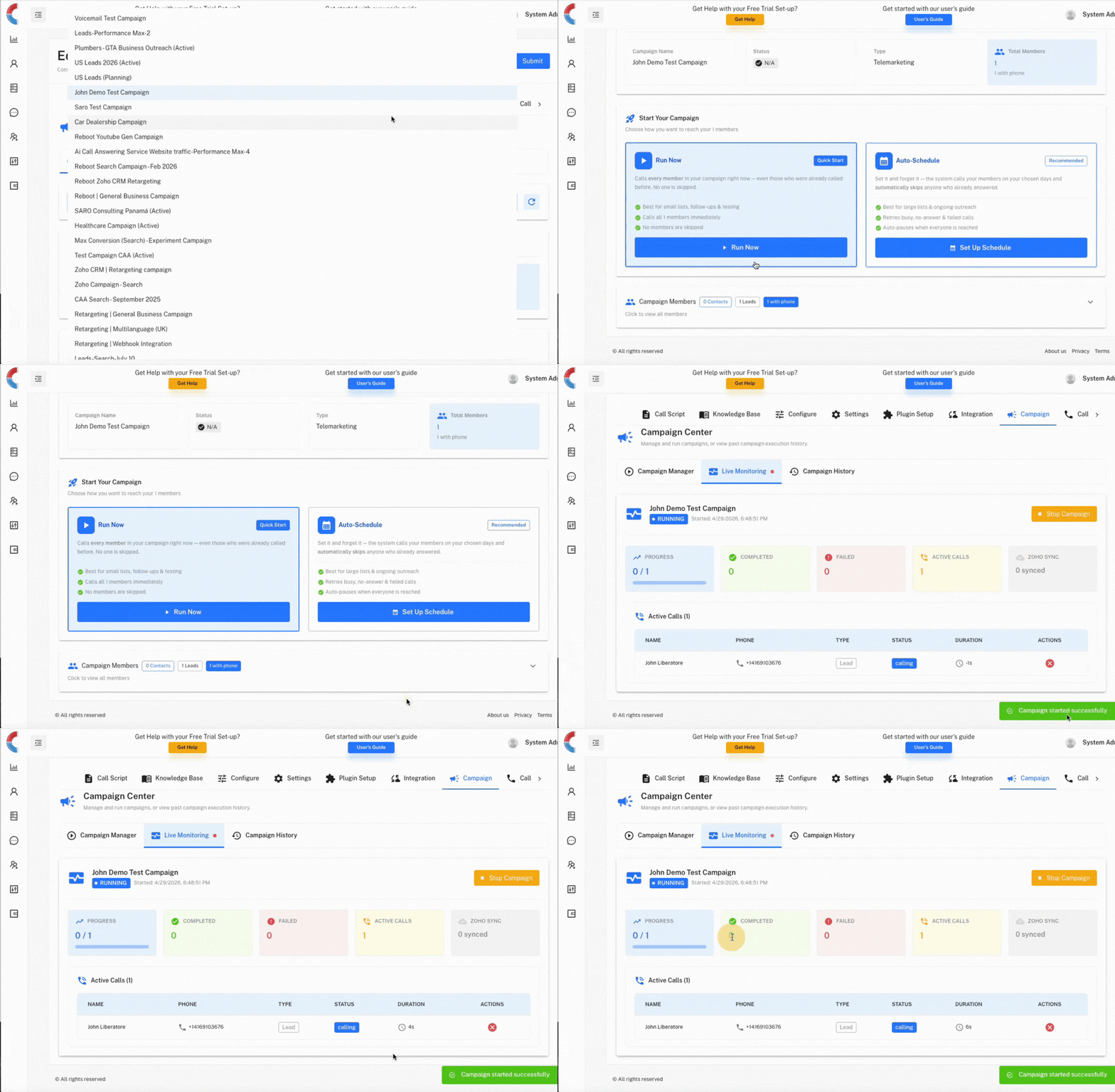
Outbound Campaigns → Run Like Email
Launch AI-powered outbound call campaigns from Zoho. Upload your contact list, set your script, and let the AI call each lead. Every contact called and CRM record updated automatically. When a lead comes in, Call Agent AI can immediately send an email and trigger follow-up workflows.
Step-by-Step: How to Connect Zoho CRM
From sign-up to live calls in under 5 minutes. Here is exactly how to get started.
Sign Up or Log In
Go to admin.callagentai.com and create your account (or log in if you already have one). You'll land on the assistant setup wizard.
Create Your AI Assistant
Name your assistant, set your business hours, upload your FAQ/knowledge base. Choose your AI voice, language, and greeting message.
Go to Integrations Tab
In your assistant settings, click the "Integrations" tab. You'll see Zoho CRM as a native integration option.
Connect with One Click
Click "Connect Zoho CRM" — you'll be redirected to Zoho's OAuth page. Authorize Call Agent AI to access your CRM. That's it — no API keys, no tokens, no code.
Choose What to Sync
Select which Zoho modules to sync: Leads, Contacts, Deals, Bookings. Configure field mapping — map caller name, phone, email, and custom fields to your Zoho layout.
Go Live
Assign a phone number to your assistant (included free). Your AI agent starts taking calls. Every interaction is logged to Zoho automatically.
What Happens During a Call
From the moment a customer dials your number to the final CRM update — here is the full journey.
Customer Calls Your Number
AI answers in your brand voice — professional, natural, and on-script.
AI Handles the Conversation
Answers questions, takes bookings, qualifies leads, and handles objections — just like your best employee.
Contact Created/Updated in Zoho
Call ends and the contact is instantly created or updated in your Zoho CRM with all details.
Notes & Transcript Auto-Populated
Call notes, full transcript, duration, outcome, and next steps are all logged — zero manual entry.
Follow-Up SMS/Email Sent
Automatic follow-up messages triggered based on call outcome — confirmations, thank-yous, or next steps.
Appointment Synced to Zoho Bookings
If a booking was made during the call, it appears in Zoho Bookings with reminders set automatically.
Outbound Campaign Continues
Running a campaign? AI calls the next lead, updates CRM, and keeps going until your list is done.
Up and running in 3 steps
Connect
Connect your Zoho CRM account in the dashboard under Assistant > Integrations. One-click OAuth.
Configure
Choose which modules to sync (Leads, Contacts, Deals). Set up call scripts, booking rules, and campaign settings.
Go Live
Your AI agent starts handling calls. Every interaction is logged, contacts created, and deals updated automatically.
Every detail, automatically
No manual data entry. Every call interaction flows directly into your Zoho CRM.
What kind of integrations can you do with Zoho?
Zoho CRM
Leads, Contacts, Deals — all synced automatically with every call interaction.
Zoho Bookings
Appointments booked during calls appear instantly in Zoho Bookings.
Zoho Campaigns
Trigger email campaigns and sequences based on call outcomes.
Webhooks
Connect to any Zoho app via custom webhooks for unlimited flexibility.
Zoho Desk
Automatically create support tickets from calls for seamless issue tracking.
Custom Workflows
Trigger any Zoho automation — lead assignment, deal updates, task creation.
Simple, transparent pricing
Zoho CRM integration is available as a $20/mo add-on for Starter & Growth plans, and included free in Pro & Enterprise.
View all plansReady to connect Call Agent AI to your Zoho CRM?
Start your free trial and have calls flowing into Zoho in under 5 minutes.